Fix "Page with Redirect" in GSC
7,950 organic clicks/mo and 557,000 impressions/mo still included a lot of redirect noise, but the real issue was the 0 external backlinks rate-limiter. If Google is indexing the wrong URL set, the audit has to separate harmless redirects from chains, canonicals, and bad migration logic.
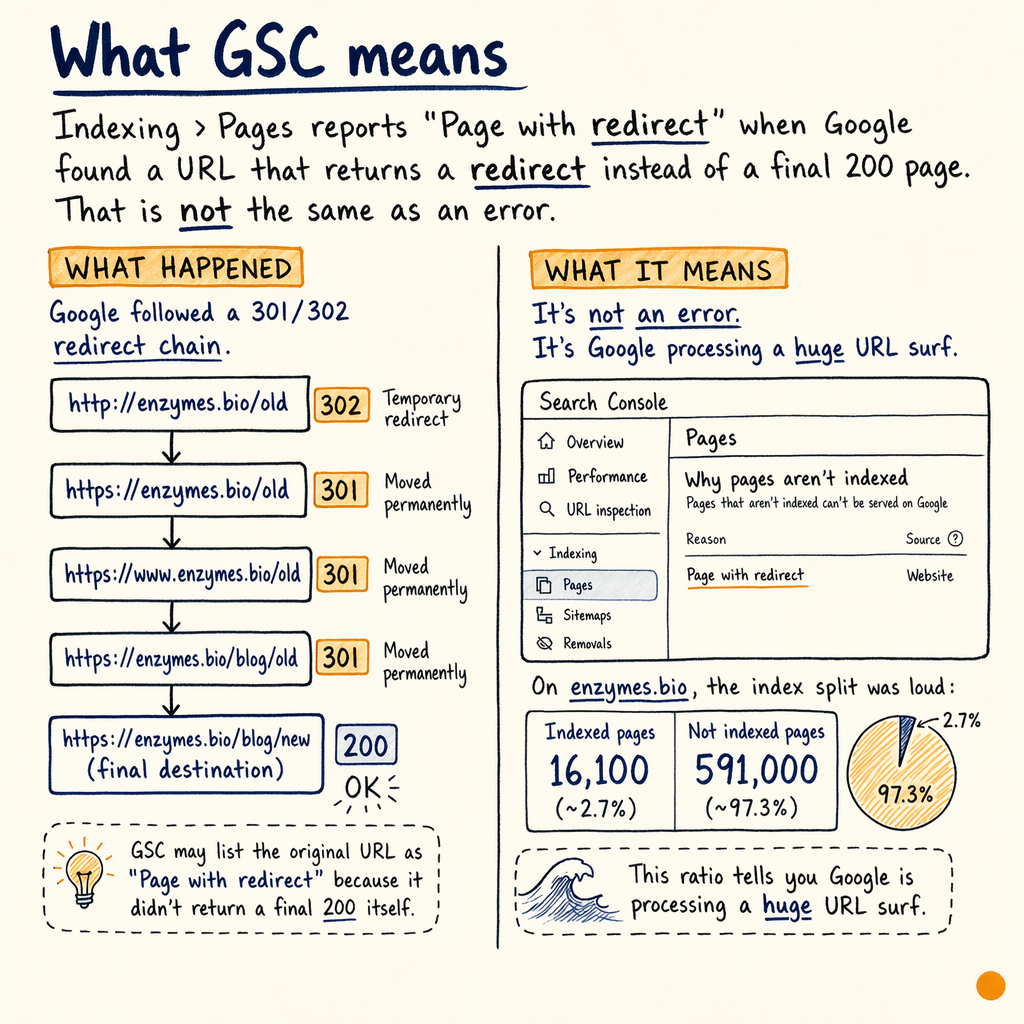
What GSC means
Indexing › Pages reports Page with redirect when Google found a URL that returns a redirect instead of a final 200 page. That is not the same as an error.
On enzymes.bio, the index split was loud: 16,100 indexed pages and 591,000 not indexed. That ratio tells you Google is processing a huge URL surface, so redirect hygiene matters more than the label itself.
The first question is simple: is the redirect intentional, single-hop, and canonicalized correctly? If yes, the status is usually noise. If no, it is often a sign that the wrong URL is being linked, submitted, or generated by templates.
When it matters
Harmless noise
A clean 301 from http to https, or from a trailing-slash variant to the preferred URL, usually just means Google is doing the right thing. The source URL stays in Page with redirect, the destination carries the signals.
Risk signal
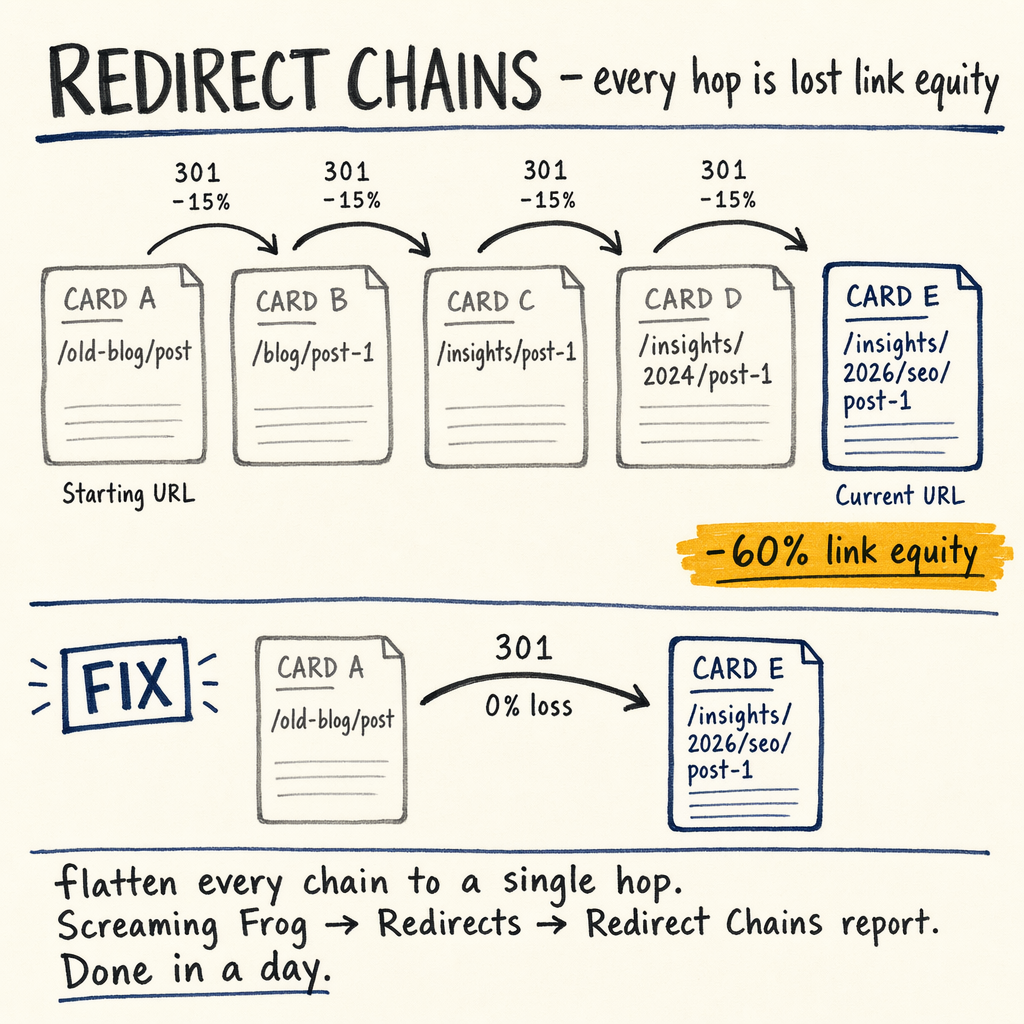
Treat it as a problem when the redirect points to another redirect, a soft-404-like destination, or a page that should have been the canonical target in the first place. That is when you start bleeding crawl budget and delaying consolidation.
Scale problem
If Settings › Crawl stats shows lots of fetches for dead URLs, the issue is rarely one bad rule. It is usually internal links, sitemap entries, or bulk redirect logic creating repeated fetches.
Migration problem
During a move, page with redirect gsc spikes are normal for a while. After launch, they should decay as Google recrawls old URLs and lands on final targets. If they do not, the redirect map needs cleanup.
Redirect types
The status code matters. 301 means permanent, 302 means temporary, 307 and 308 preserve method semantics and are used when the client should keep request behavior intact. For SEO, the practical split is still permanent vs temporary.
If a page should never come back, use a permanent redirect. If a seasonal or test URL may return later, use a temporary one. Do not use a 302 just because the CMS defaulted to it; that can slow consolidation and confuse gsc redirect status review.
Cloudflare bulk redirects are fine for pattern-level rules, but they can hide mistakes if the source list is too broad. At server level, .htaccess is convenient on Apache, while nginx rewrites are faster and usually easier to reason about when you need to map thousands of URLs.
301 versus 302
| Field | 301 | 302/307/308 |
|---|---|---|
SEO intent | Permanent move | Temporary or method-preserving move |
Signal consolidation | Fastest path to one target | May be slower or ambiguous |
Use case | Old URL replaced by new URL | A/B tests, temp promos, maintenance, method-safe reroutes |
Risk if wrong | Usually low if destination is correct | Can keep old URLs in circulation |
Best practice | One hop to final canonical URL | Only when the redirect really is temporary |
Check chains fast
curl -I https://example.com/old-page
curl -I -L https://example.com/old-page
curl -sI https://example.com/old-page | grep -i '^location:'

# Compare each hop until the final 200
# 301 -> 302 -> 200 is a chain you should flatten
Fix redirect sources
The page with redirect fix usually starts upstream, not in GSC. Check internal links first, then XML sitemaps, then templates, then CMS defaults.
If a product page, category page, or article still points at the old URL, Google will keep rediscovering the redirect. That is why Indexing › Sitemaps and Performance › Search results should be read together. If the destination URL is getting impressions but the source still gets crawled, the source is still being advertised somewhere.
Use redirect chain checker to find extra hops. Then replace the source URL directly in HTML, navigation, canonicals, and structured data. If you need a deeper ruleset review, compare your implementation against redirects, 301, 302, canonical and canonical tags complete guide.
Audit the index
- ✓
Open
Indexing › Pagesand filter for Page with redirect plus any pairedBlocked by robots.txt,Duplicate without user-selected canonical, orAlternate page with proper canonical tagrows. - ✓
Verify the destination returns
200, has the expected canonical, and is not itself redirecting again. - ✓
Check
Enhancements › Breadcrumbs,Enhancements › Product snippets, andEnhancements › FAQfor old URLs that still receive structured data signals. - ✓
Inspect
Links › External linksfor legacy backlinks landing on redirecting URLs. With 0 external backlinks, enzymes.bio had no external-link cleanup pressure, but most sites are not that clean. - ✓
Review
Settings › Crawl statsfor repeat fetches of the same dead paths. - ✓
If you see Cloudflare bulk rules, confirm the pattern is not catching live URLs by accident.
Sample rewrite rules
{
  "apache_htaccess": "Redirect 301 /old-page /new-page\nRewriteRule ^old/(.*)$ /new/$1 [R=301,L]",
  "nginx": "rewrite ^/old-page$ /new-page permanent;\nrewrite ^/old/(.*)$ /new/$1 permanent;",
  "cloudflare_bulk_redirect": {
    "source": "/old-page",
    "target": "/new-page",
    "status_code": 301
  }
}
Migration edge cases
Redirect handling gets messy during site migrations, multilingual setups, and platform changes. enzymes.bio runs 35 languages via TranslatePress, which means path changes, language variants, and translation routing can all create redirect noise if the rules are layered badly.
That is why migration audits are about order of operations. Set the final URL map first, then enforce canonicals, then validate redirects, then regenerate sitemaps. If you do it backwards, Google will spend weeks rediscovering URLs you never wanted indexed.
If you are moving domains, changing CMS, or consolidating legacy folders, a site migration SEO review is the point where you catch chain depth, wrong status codes, and template-level link leaks before launch.
Common questions
Is Page with redirect a problem in GSC?
Not by itself. It is expected for old URLs, moved content, and clean canonicalization. It becomes a problem when the redirect is chained, temporary without reason, or still linked internally.
Should I use 301, 302, 307, or 308?
Use 301 for permanent moves. Use 302 or 307 only when the redirect is temporary or request behavior must be preserved. Use 308 when you need a permanent equivalent that preserves method semantics.
How do I fix redirect chains?
Point every source directly at the final 200 URL. Update internal links, canonicals, sitemaps, and structured data. Then confirm the hop count with a crawler or curl -I -L.
Why does Google still show the old URL?
Because Google found the old URL in links, sitemaps, or historic crawl data. It usually drops it after enough recrawls, but only if the redirect is stable and the destination is clearly canonical.
Do bulk redirect tools cause problems?
Only when the pattern is too broad or the destination is wrong. Cloudflare bulk redirects are good for simple maps, but they can hide accidental overreach if you do not test edge cases.
What should I read next?
Start with Google Search Console coverage report errors and redirects, 301, 302, canonical, then check Enhancements and Crawl stats.